Lenny’s Little Apollo Book
Apollo Federation Patterns: Managing Secrets
April 25, 2020
This post is part of a series about Apollo Federation architectural patterns. Check out the introduction for some background on how the example code is structured.
This is the first pattern of the series to leverage @requires directives and
the advanced topic of “computed fields”.
We try our best to avoid storing sensitive information in our databases. Instead, we usually “tokenize” sensitive data like Tax IDs and Credit Card Numbers—replacing the original value with an opaque token that can’t be algorithmically converted back. This avoids leaking sensitive data in the event of a breach, while still allowing us to share values between systems.
type PaymentCard {cardBrand: PaymentCardBrand! # VISA, MASTERCARD, etccardNumberToken: String! # opaque token}
query {payments {nodes {idpaymentCard {# We can't know what the card number is, but we can# tell if two payments were made with the same card# number by comparing tokens.cardNumberToken}}}}
Our “secret tokenizer” service is the only way to convert a tokenized value back into the original secret. Several services can call the tokenizer service’s “tokenize” API, but very few services can call the “de-tokenize” API.
If we put a federated graph service in front of the “secret tokenizer” service, we can have a service topology like this:
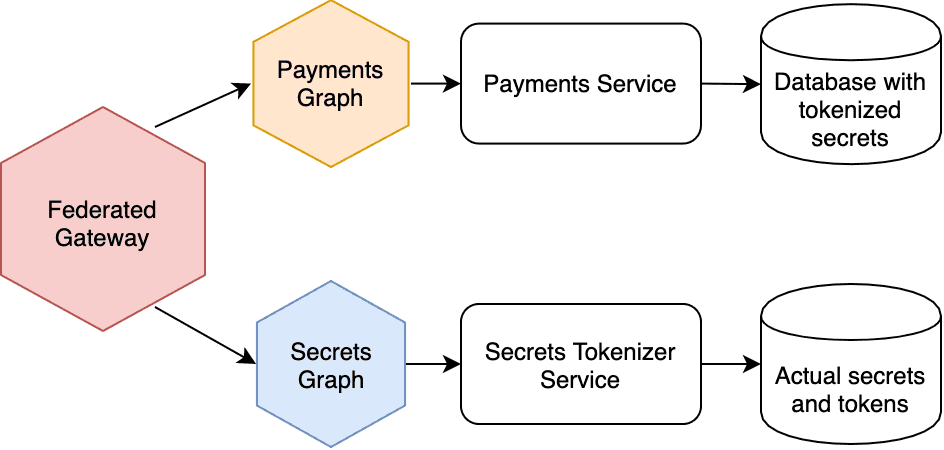
The thing about this diagram that makes me really happy is that we don’t have a line connecting Payments services with Secrets services. This is a clear example of how an API Gateway can reduce coupling between services.
Example Sandbox
In this example, I’ve made a special graph service specifically for de-tokenizing values and providing them as simple fields on types like Employee and PaymentCard. It tells the Apollo Gateway that it needs the tokenized values by referencing them using @requires directives.
extend type PaymentCard @key(fields: "id") {id: ID! @externalcardNumberToken: String! @externalcardNumber: String @requires(fields: "cardNumberToken")}
I love this pattern because only one service needs access to the “de-tokenize” API. This reduces attack surface area, while also providing a uniform end-user API for both the tokenized and original values.
The implemenation could not be simpler: the @requires directives ensure
that the tokenized fields end up in the entity representation passed to the
secrets graph and our resolvers look something like this:
const resolvers = {PaymentCard: {cardNumber({ cardNumberToken }) {return SUPER_SECRET_DB.fetch(cardNumberToken)},},}
Authorization
The secrets graph service gives you another opportunity to control access to sensitive information. I think this is a great example of defense in depth.
Note the two tabs in the GraphQL Playground UI: one tab has an Authorization
header that references a user session with only the “basic” access role. The
second tab’s Authorization header references a user with the “admin” access
role. The secrets graph service returns an error when a non-admin user tries to
fetch the socialSecurityNumber or cardNumber fields.
(In a production federated gateway, you would propagate the Authorization
headers to the upstream graph services by customizing request headers.
By use LocalGraphQLDataSource in this demo, each resolver has access
to the Apollo Server context automatically.)
One final detail I’d like to point out is that I’ve specified the cardNumber
field as nullable (no ! ). This indicates to clients that the API may
not be able to fulfill this field, depending on the session and permissions.
The Query Plan
Here’s an example query plan. You can see how the cardNumberToken is passed
between services even though it’s not present in the actual query operation.
query {paymentCard(id: "card2") {idcardBrandcardNumber}}
QueryPlan {Sequence {Fetch(service: "/sandbox/src/services/payment-cards.js") {{paymentCard(id: "card2") {idcardBrand__typenamecardNumberToken}}},Flatten(path: "paymentCard") {Fetch(service: "/sandbox/src/services/secrets.js") {{... on PaymentCard {__typenameidcardNumberToken}} =>{... on PaymentCard {cardNumber}}},},},}

Written by Lenny Burdette in San Francisco. You can follow him on twitter but he doesn't tweet. Opinions written here do not necessarily reflect those of his employers and are subject to change.