Lenny’s Little Apollo Book
Apollo Federation Patterns: Relationships
April 23, 2020
This post is part of a series about Apollo Federation architectural patterns. Check out the introduction for some background on how the example code is structured.
The quintessential use case for federation is modeling cross-service relationships. I highly recommend watching James’ talk on Apollo Federation for a great introduction.
In this example, we’ll demonstrate the schema used to introduce federation in the official Apollo documentation.
Here’s an entity relationship diagram covering the three entity types (User,
Product, and Review) as they exist in three services.
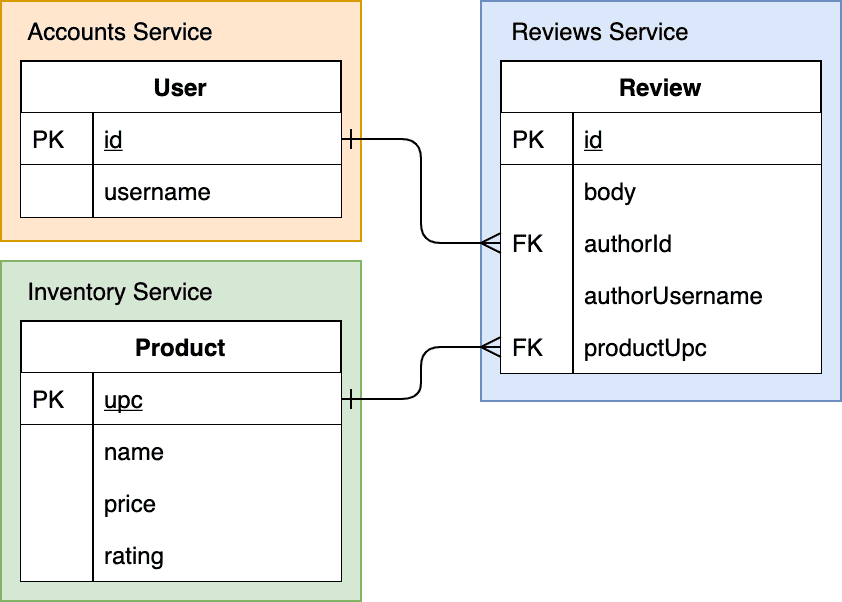
This Entity Relationship Diagram shows how the three systems use primary
keys (PK) to identify identities (e.g. User.id) and foreign keys (FK)
to create relationships (e.g. Review.authorId).
We want to support queries like this one, which fetches “my” reviews and the associated products:
query MyReviews {me {usernamereviews {bodyproduct {nameupc}}}}
When figuring out how to connect entities across services using federation, start by looking for foreign keys. The service that owns the foreign key is the owner of the entity relationship.
In this example, the Reviews service own foreign keys for both Users and Products, so it can provide the relationship in both directions.
One-to-one Relationships
For a one-to-one relationship like a review’s author, we can add a field
to the Review type that returns a minimal User type.
# Reviews Servicetype Review {body: Stringauthor: User}extend type User @key(fields: "id") {id: ID! @external}
The Reviews service’s User is a compatible subset of the type that exists in
the Accounts service. As long as the Review service’s User and the Account
service’s User agree on names, types, and federation directives like @key,
they’re composable in the gateway.
# Account Servicetype User @key(fields: "id") {id: ID!username: String!emailAddress: String# ... other fields}
Entity Representations
We can now write a resolver to return an entity representation of the User
type using the data stored in the Reviews service. Because the Reviews service
stores the User foreign key as Review.authorId we can construct an entity
representation like { __typename: 'User', id: '1' }.
// Reviews serviceconst resolvers = {Review: {author(review) {// Return an "entity representation" of the user.// Apollo Server will automatically add the __typename: "User"// field to complete the representation.return { id: review.authorId }},},}
At this point, the Gateway can fetch additional user data from Accounts service
using the entity representation. A federated graph service like Accounts
provides a query root field called _entities so that the Gateway can arbitrarily
fetch entities using these entity representation from other services.
query {_entities(representations: [{ __typename: 'User', id: '1' }]) {... on User {usernameemailAddress}}}
One-to-many Relationships
Because the Reviews service owns the foriegn keys associating Users and Reviews,
it can also fulfill one-to-many relationships like a user’s reviews. It does
this by “extending” the User type with new fields.
# Reviews Servicetype Review {body: String}extend type User @key(fields: "id") {id: ID! @external# new field owned by the Reviews servicereviews: [Review]}
Now we need a way to fetch a User and its reviews from the Reviews service.
This is another use case for the _entities query root field and entity
representations. The gateway might make a request to the Reviews service that
looks like this:
{_entities(representations: [{ __typename: 'User', id: '1' }]) {... on User {reviews {body}}}}
In this case, the resolver is actually very simple:
// Reviews serviceconst resolvers = {User: {reviews(userRepresentation) {return fetchReviewsForUserId(userRepresentation.id)},},}
Under the hood, the Apollo Federation library knows how to convert the entity
representation to a User type. We can then add resolvers for additional fields
like we would for any other field.
Sometimes you might need to alter how Apollo Federation converts the entity
representation to a runtime object. You can use the __resolveReference
hook to do that.
Homework
This example has two more relationships: Review.product and Product.reviews. They’re very similar to the previous examples. Check out this running sandbox to see how they work in a federated graph.
The Full Query Plan
One of the coolest features of Apollo Gateway is the ability to see a textual representation of the query plan for a federated query. Here’s the query we want to support again:
query MyReviews {me {usernamereviews {bodyproduct {nameupc}}}}
And here’s the full query plan. I’ve added some comments to notate different elements of the query plan and described them below.
QueryPlan {Sequence { # NOTE 1Fetch(service: "/sandbox/src/services/accounts.js") { # NOTE 2{me {username__typename # for the entity representationid # for the entity representation}}},Flatten(path: "me") {Fetch(service: "/sandbox/src/services/reviews.js") { # NOTE 3{... on User { # the User entity representation argument__typenameid}} =>{... on User {reviews {bodyproduct {__typename # for the entity representationupc # for the entity representation}}}}},},Flatten(path: "me.reviews.@.product") { # NOTE 4Fetch(service: "/sandbox/src/services/inventory.js") { # NOTE 5{... on Product { # the Product entity representation argument__typenameupc}} =>{... on Product {name}}},},},}
- We need to fetch data from all three services one at a time,
so the outer-most part of the plan is a
Sequenceelement. - The first request is for a User entity from the
mefield, which is definied in the Accounts service. In addition to fetching theusernamefield as defined in the operation, we’ll fetch the fields needed to create a entity representation of the user for later requests. - Once we have a User entity representation, we’ll use that as input to the Reviews service. This request will return a user, its reviews, and entity representations for the products associated with each review.
- The previous request (3) returned a list of reviews
and entity representations for products. This
Flattenstep extracts the product representations and makes a batch query to the Inventory service. This elegantly solves the N+1 Query Problem! - This batch request uses product entity representations to fetch additional product data that’s stored only in the Inventory service.
To learn more, I can’t recommend the official documentation enough. It’s very easy to read and covers all the feature and concepts used in the pattern and in the patterns to come.
Next up: Combining Data Sources!

Written by Lenny Burdette in San Francisco. You can follow him on twitter but he doesn't tweet. Opinions written here do not necessarily reflect those of his employers and are subject to change.